Ollama for open source LLMs
Introduction
- Ollama is an open-source framework that enables users to run, create, and manage large language models (LLMs) locally on their computers and on HPC system.
- Ollama was first released in July 2023 and has gained significant attention from GenAI community.
Key features of Ollama
- Model Library: Ollama provides access to a diverse collection of pre-built models, including GPT-OSS (OpenAI), Gemma (Google), Llama (Meta), Phi (Microsoft), Qwen (Alibaba), and Kimi, among others. Users can easily download and run these models for various applications.
- Customization: Users can create and customize their own models using a straightforward API, allowing for tailored solutions to specific tasks.
- Cross-Platform Support: Ollama is compatible with macOS, Linux, and Windows operating systems, ensuring broad accessibility.
Ollama on HPC
- Although user can run Ollama on their personal PCs but with very large LLM model like LLAMA3 with 70B or 450B, you would need a stronger commercial graded GPU as A100 or V100 GPU
- The model like LLAMA3 450B can easily consumes 200gb storage of your PCs, so we have that saved locally for user to just load and run it
Download and install ollama
- Different version of ollama can be download from ollama github page
- There are many installed packages to choose, for the HPC system, we choose ollama-linux-amd64.tar.zst to download.
- Untar the file:
$ tar -xvf ollama-linux-amd64.tar.zst
- After untar the file, the bin and lib folders are created. You can set $PATH to bin and lib location and start using ollama.
How to run ollama
- Request a compute node with 1 GPU
- You will need to serve the ollama model on that GPU node. Here we use & to run this ollama in background
$ ollama serve &
Some ollama command:
$ ollama --version & # to check the version of ollama
# ollama list & # to list all downloaded LLMs to the location where you specified OLLAMA_BASE_DIR
$ ollama serve & # to initialize ollama
$ ollama pull LLMs_name # to download LLMs
$ ollama run LLMS_name # to run LLMs
$ killall ollama # to kill ollama served on the GPU node
- By default, your Ollama storage will be your $HOME location. You can change the location to download LLMs to other shared storage if needed:
export OLLAMA_BASE_DIR=PATH_TO_YOUR_LOCATION
Run ollama
From terminal:
- ollama can be run from terminal, for example
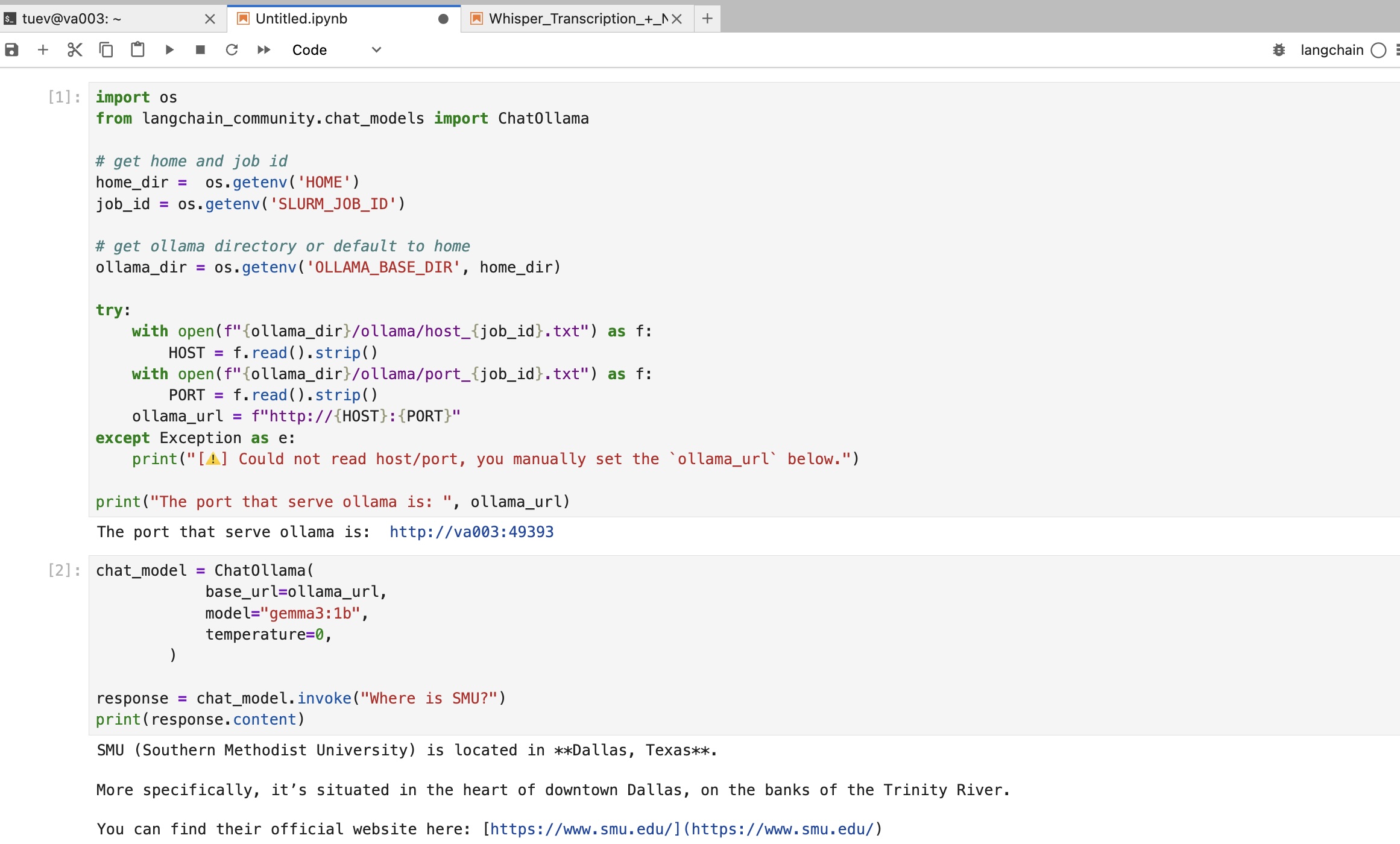
From Jupyter Lab
- Create a conda env and install langchain to it
- Following is the code to run
import ollama
import subprocess
import os
# --- LLM & RAG ---
from langchain_community.chat_models import ChatOllama

chat_model = ChatOllama(
            base_url=ollama_url,
            model="gpt-oss:20b",
            temperature=0,
        )

response = chat_model.invoke("Where is SMU")
print(response.content)
Some known problem with running ollama on the same GPU node
- Each of our HPC node has 8 GPUs. If 2 or more users sharing the same node with different GPU, there might be a problem when they both serve ollama on the same node because the same port 11434 will be used. Therefore: the ollama may crash or user may have to wait for other’s ollama command to finish in order to execute their own ollama
- Solution: We can force these users to use different port number and use the preinstalled ollama from the system. Following is the command in terminal and then in Jupyter Lab:
$ module load ollama
$ ollama serve &