GraphRAG
Introduction
- In the Basic RAG post, we retrieved similar text chunks from a vector store and asked an LLM to answer from that context.
- GraphRAG goes one step further: it builds a knowledge graph over those chunks, then walks the graph to gather connected context before answering.
- Idea in one sentence: chunks are nodes; similar / related chunks are linked by edges; answering a question means starting from the best matches and following useful links until the context is enough.
Why GraphRAG?
- Standard RAG can miss related facts that live in a neighboring chunk (same topic, different wording).
- A graph lets the system follow shared concepts and semantic similarity, not only the top-k embedding hits.
- Useful when documents are long and answers need pieces from several places (for example climate, policy, and impacts discussed across pages).
How it works (high level)
PDF --> chunks --> embeddings (FAISS)
              \
               --> knowledge graph (nodes + edges)
                        |
User question --> seed nodes --> graph traversal --> LLM answer
- Load & split — load a PDF and split it into overlapping chunks.
- Embed & index — store chunk vectors in FAISS for fast similarity search.
- Build a knowledge graph — one node per chunk; edges when chunks are similar and share concepts.
- Query with graph traversal — start from relevant nodes, walk the graph until the LLM says the context is complete.
- Generate / visualize — return the answer and optionally show the path taken.
Models used
- LLM:
gemma3:12bvia Ollama (local) - Embeddings:
mxbai-embed-large:335mvia Ollama (local)
Step by Step Coding guide
- Make sure Ollama is running and both models are pulled (
ollama pull gemma3:12bandollama pull mxbai-embed-large:335m). - You will also need packages such as
langchain,langchain-ollama,langchain-community,faiss-cpu,networkx,spacy,nltk,scikit-learn, andmatplotlib.
Step 0: Import packages
import networkx as nx
from langchain_community.vectorstores import FAISS
from langchain_text_splitters import RecursiveCharacterTextSplitter
from langchain_core.prompts import PromptTemplate
from langchain_community.document_loaders import PyPDFLoader
from sklearn.metrics.pairwise import cosine_similarity
import matplotlib.pyplot as plt
import matplotlib.patches as patches
import numpy as np
import heapq

from langchain_ollama import ChatOllama, OllamaEmbeddings

from nltk.stem import WordNetLemmatizer
import nltk
import spacy
from spacy.cli import download
from tqdm import tqdm

nltk.download("punkt", quiet=True)
nltk.download("punkt_tab", quiet=True)
nltk.download("wordnet", quiet=True)
Step 1: Initialize the LLM and embedding model
- ChatOllama reasons, extracts concepts, and answers questions.
- OllamaEmbeddings turns text into vectors for similarity search.
llm = ChatOllama(model="gemma3:12b", temperature=0)
embedding_model = OllamaEmbeddings(model="mxbai-embed-large:335m")
Step 2: Load the PDF document
- We keep only the first 10 pages so the demo stays manageable.
path = "data/Understanding_Climate_Change.pdf"

loader = PyPDFLoader(path)
documents = loader.load()
documents = documents[:10]

print(f"Loaded {len(documents)} pages")
Step 3: Split documents into chunks
- Same idea as Basic RAG: limit token length and keep overlap so ideas are not cut cleanly at boundaries.
text_splitter = RecursiveCharacterTextSplitter(chunk_size=1000, chunk_overlap=200)
splits = text_splitter.split_documents(documents)

print(f"Split {len(documents)} pages into {len(splits)} chunks")
Step 4: Create the vector store (FAISS)
- Embed each chunk and index it for fast “find similar text” queries.
vector_store = FAISS.from_documents(splits, embedding_model)
print(f"Vector store created with {len(splits)} vectors")
Step 5: Build the knowledge graph — add nodes
- Each node is one text chunk. The node stores the chunk content.
graph = nx.Graph()

for i, split in enumerate(splits):
    graph.add_node(i, content=split.page_content)

print(f"Added {len(graph.nodes)} nodes to the graph")
Step 6: Create embeddings for all chunks
- We need pairwise similarity later to decide which nodes get edges.
texts = [split.page_content for split in splits]
embeddings = embedding_model.embed_documents(texts)

print(f"Created embeddings for {len(embeddings)} chunks")
print(f"Embedding dimension: {len(embeddings[0])}")
Step 7: Extract concepts and entities from each chunk
- For each chunk we extract:
- Named entities (people, organizations, places) with spaCy
- Key concepts (abstract ideas such as “greenhouse effect”) with the LLM
- These labels are stored on each node and used to find shared topics between chunks.
try:
    nlp = spacy.load("en_core_web_sm")
except OSError:
    download("en_core_web_sm")
    nlp = spacy.load("en_core_web_sm")

concepts_schema = {
    "title": "Concepts",
    "type": "object",
    "properties": {
        "concepts_list": {
            "type": "array",
            "items": {"type": "string"},
            "description": "List of concepts",
        }
    },
    "required": ["concepts_list"],
}

concept_extraction_prompt = PromptTemplate(
    input_variables=["text"],
    template=(
        "Extract key concepts (excluding named entities) from the following text:\n\n"
        "{text}\n\nKey concepts:"
    ),
)
concept_chain = concept_extraction_prompt | llm.with_structured_output(concepts_schema)

concept_cache = {}

for i, split in enumerate(tqdm(splits, desc="Extracting concepts")):
    content = split.page_content

    if content in concept_cache:
        graph.nodes[i]["concepts"] = concept_cache[content]
        continue

    doc = nlp(content)
    named_entities = [
        ent.text
        for ent in doc.ents
        if ent.label_ in ["PERSON", "ORG", "GPE", "WORK_OF_ART"]
    ]

    general_concepts = concept_chain.invoke({"text": content})["concepts_list"]
    all_concepts = list(set(named_entities + general_concepts))

    concept_cache[content] = all_concepts
    graph.nodes[i]["concepts"] = all_concepts

print(f"Example — Node 0 concepts: {graph.nodes[0]['concepts']}")
Step 8: Add edges based on similarity and shared concepts
- Connect two nodes if cosine similarity is above a threshold (here
0.8). - Edge weight blends:
- 70% semantic similarity
- 30% shared concepts
- Higher weight = stronger connection for traversal.
EDGES_THRESHOLD = 0.8
ALPHA = 0.7  # semantic similarity
BETA = 0.3   # shared concepts

similarity_matrix = cosine_similarity(embeddings)
num_nodes = len(graph.nodes)

for node1 in tqdm(range(num_nodes), desc="Adding edges"):
    for node2 in range(node1 + 1, num_nodes):
        sim_score = similarity_matrix[node1][node2]

        if sim_score > EDGES_THRESHOLD:
            concepts1 = set(graph.nodes[node1]["concepts"])
            concepts2 = set(graph.nodes[node2]["concepts"])
            shared = concepts1 & concepts2

            max_possible = min(len(concepts1), len(concepts2))
            norm_shared = len(shared) / max_possible if max_possible > 0 else 0
            edge_weight = ALPHA * sim_score + BETA * norm_shared

            graph.add_edge(
                node1,
                node2,
                weight=edge_weight,
                similarity=sim_score,
                shared_concepts=list(shared),
            )

print(f"Graph has {len(graph.nodes)} nodes and {len(graph.edges)} edges")
Step 9: Define the query
query = "what is the main cause of climate change?"
print(f"Query: {query}")
Step 10: Retrieve relevant documents from the vector store
- Same first move as Basic RAG: get the top-k similar chunks. These become seed nodes for graph traversal.
retriever = vector_store.as_retriever(
    search_type="similarity", search_kwargs={"k": 5}
)
relevant_docs = retriever.invoke(query)

print(f"Retrieved {len(relevant_docs)} relevant documents")
Step 11: Traverse the knowledge graph
- This is the core of GraphRAG:
- Put the most relevant nodes in a priority queue.
- Visit a node, add its text to the context, and ask the LLM: “Is this enough to answer?”
- If not, expand to neighbors with strong edges (Dijkstra-like distances).
- Stop when the LLM reports a complete answer (or the queue is empty).
answer_check_schema = {
    "title": "AnswerCheck",
    "type": "object",
    "properties": {
        "is_complete": {
            "type": "boolean",
            "description": "Whether the current context provides a complete answer",
        },
        "answer": {
            "type": "string",
            "description": "The current answer based on the context, if any",
        },
    },
    "required": ["is_complete", "answer"],
}

answer_check_prompt = PromptTemplate(
    input_variables=["query", "context"],
    template=(
        "Given the query: '{query}'\n\n"
        "And the current context:\n{context}\n\n"
        "Does this context provide a complete answer to the query? "
        "If yes, provide the answer. If no, state that the answer is incomplete.\n\n"
        "Is complete answer (Yes/No):\nAnswer (if complete):"
    ),
)
answer_check_chain = answer_check_prompt | llm.with_structured_output(
    answer_check_schema
)

lemmatizer = WordNetLemmatizer()

expanded_context = ""
traversal_path = []
visited_concepts = set()
filtered_content = {}
final_answer = ""

priority_queue = []
distances = {}

# Seed the queue from vector-store hits
for doc in relevant_docs:
    closest_nodes = vector_store.similarity_search_with_score(doc.page_content, k=1)
    closest_node_content, similarity_score = closest_nodes[0]

    closest_node = next(
        n
        for n in graph.nodes
        if graph.nodes[n]["content"] == closest_node_content.page_content
    )

    priority = 1 / max(similarity_score, 1e-10)
    heapq.heappush(priority_queue, (priority, closest_node))
    distances[closest_node] = priority

# Walk the graph
while priority_queue:
    current_priority, current_node = heapq.heappop(priority_queue)

    if current_priority > distances.get(current_node, float("inf")):
        continue

    if current_node not in traversal_path:
        traversal_path.append(current_node)
        node_content = graph.nodes[current_node]["content"]
        node_concepts = graph.nodes[current_node]["concepts"]

        filtered_content[current_node] = node_content
        expanded_context += "\n" + node_content if expanded_context else node_content

        response = answer_check_chain.invoke(
            {"query": query, "context": expanded_context}
        )
        if response["is_complete"]:
            final_answer = response["answer"]
            break

        node_concepts_set = set(
            " ".join([lemmatizer.lemmatize(w) for w in c.lower().split()])
            for c in node_concepts
        )

        if not node_concepts_set.issubset(visited_concepts):
            visited_concepts.update(node_concepts_set)

            for neighbor in graph.neighbors(current_node):
                edge_weight = graph[current_node][neighbor]["weight"]
                distance = current_priority + (1 / edge_weight)

                if distance < distances.get(neighbor, float("inf")):
                    distances[neighbor] = distance
                    heapq.heappush(priority_queue, (distance, neighbor))

print(f"Traversal visited {len(traversal_path)} nodes: {traversal_path}")
Step 12: Generate the final answer
- If traversal already produced a complete answer, use it.
- Otherwise, ask the LLM once more with all accumulated context.
if not final_answer:
    response_prompt = PromptTemplate(
        input_variables=["query", "context"],
        template=(
            "Based on the following context, please answer the query.\n\n"
            "Context: {context}\n\nQuery: {query}\n\nAnswer:"
        ),
    )
    response_chain = response_prompt | llm
    final_answer = response_chain.invoke(
        {"query": query, "context": expanded_context}
    )

print(f"Question: {query}")
print(f"\nAnswer: {final_answer}")
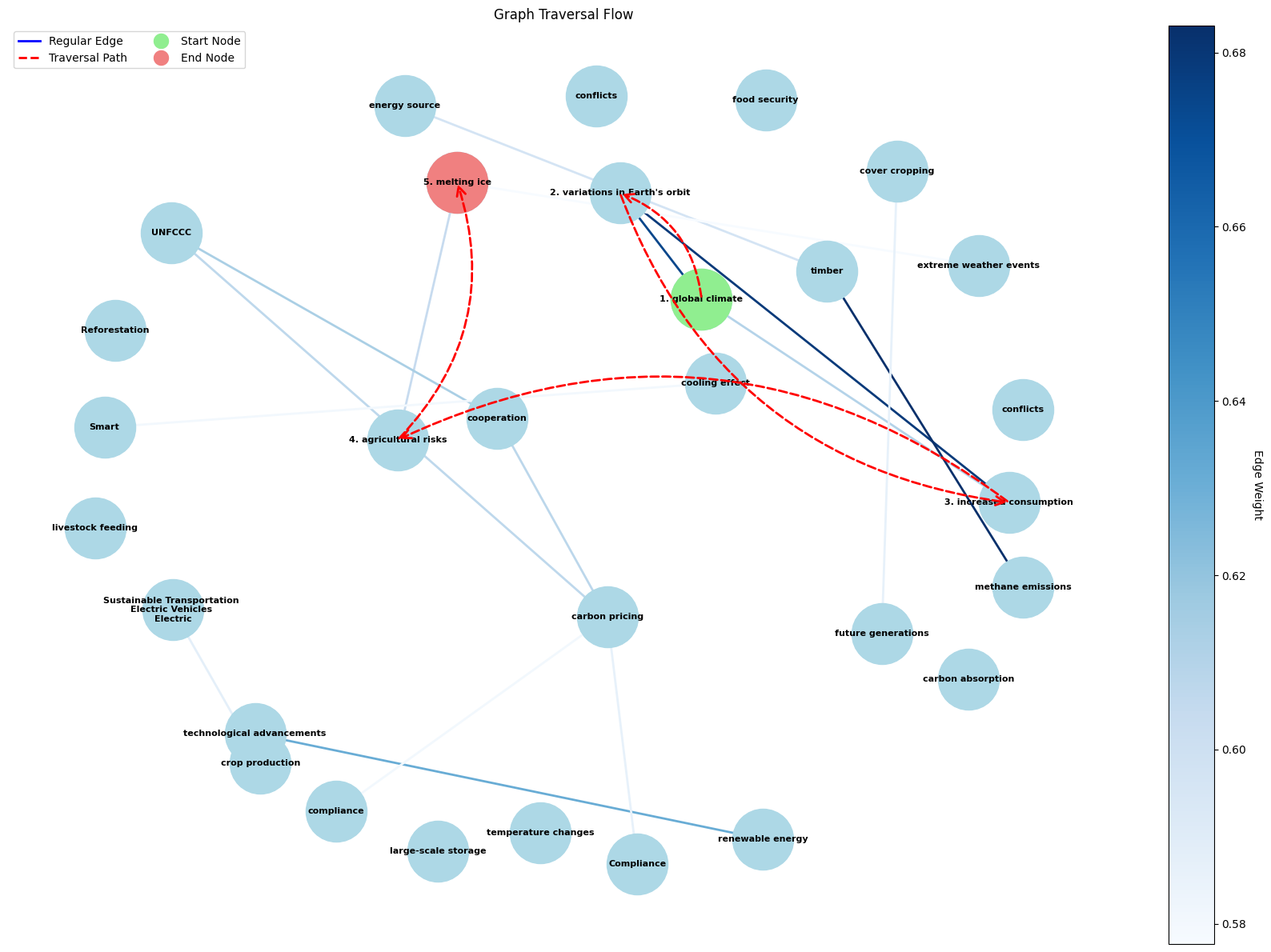
Step 13: Visualize the graph traversal
- Light blue nodes = full graph; red dashed arrows = path taken; green = start; coral = end.
if traversal_path:
    traversal_graph = nx.DiGraph()
    for node in graph.nodes():
        traversal_graph.add_node(node)
    for u, v, data in graph.edges(data=True):
        traversal_graph.add_edge(u, v, **data)

    fig, ax = plt.subplots(figsize=(16, 12))
    pos = nx.spring_layout(traversal_graph, k=1, iterations=50)

    edges = list(traversal_graph.edges())
    edge_weights = [traversal_graph[u][v].get("weight", 0.5) for u, v in edges]
    nx.draw_networkx_edges(
        traversal_graph,
        pos,
        edgelist=edges,
        edge_color=edge_weights,
        edge_cmap=plt.cm.Blues,
        width=2,
        ax=ax,
    )
    nx.draw_networkx_nodes(
        traversal_graph, pos, node_color="lightblue", node_size=3000, ax=ax
    )

    for i in range(len(traversal_path) - 1):
        start, end = traversal_path[i], traversal_path[i + 1]
        arrow = patches.FancyArrowPatch(
            pos[start],
            pos[end],
            connectionstyle="arc3,rad=0.3",
            color="red",
            arrowstyle="->",
            mutation_scale=20,
            linestyle="--",
            linewidth=2,
            zorder=4,
        )
        ax.add_patch(arrow)

    labels = {}
    for i, node in enumerate(traversal_path):
        concepts = graph.nodes[node].get("concepts", [])
        labels[node] = f"{i + 1}. {concepts[0] if concepts else ''}"
    for node in traversal_graph.nodes():
        if node not in labels:
            concepts = graph.nodes[node].get("concepts", [])
            labels[node] = concepts[0] if concepts else ""
    nx.draw_networkx_labels(
        traversal_graph, pos, labels, font_size=8, font_weight="bold", ax=ax
    )

    nx.draw_networkx_nodes(
        traversal_graph,
        pos,
        nodelist=[traversal_path[0]],
        node_color="lightgreen",
        node_size=3000,
        ax=ax,
    )
    nx.draw_networkx_nodes(
        traversal_graph,
        pos,
        nodelist=[traversal_path[-1]],
        node_color="lightcoral",
        node_size=3000,
        ax=ax,
    )

    ax.set_title("Graph Traversal Flow")
    ax.axis("off")
    plt.tight_layout()
    plt.show()
Step 14: Inspect visited content
- Print the chunks the system used, in traversal order, to check grounding.
for i, node in enumerate(traversal_path):
    print(f"Step {i + 1} - Node {node}:")
    print(f"{filtered_content.get(node, 'No content')[:200]}...")
    print("-" * 50)
Summary
- Basic RAG: retrieve top-k chunks → generate.
- GraphRAG: retrieve seeds → expand along a concept/similarity graph → generate when context is enough.
- Trade-off: GraphRAG can find richer multi-hop context, but concept extraction and traversal cost more LLM calls and time.