Fusion Retrieval in RAG
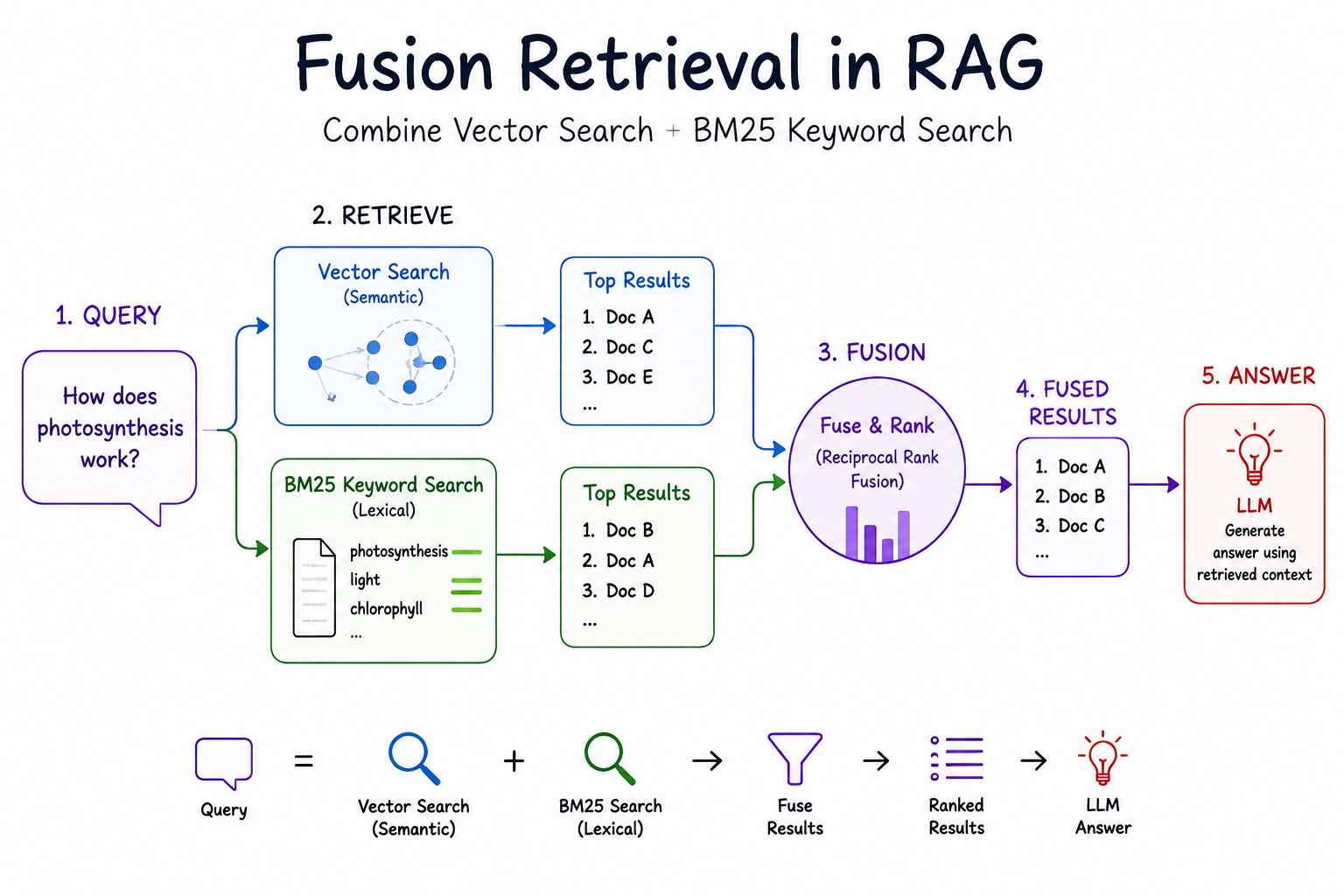
Introduction
- In the Basic RAG post, retrieval relied on vector search: find chunks whose embeddings are close to the question.
- Vector search is strong at meaning (synonyms, paraphrases), but it can miss exact keywords (for example a chemical formula, an ID, or a rare acronym).
- BM25 is a classic keyword ranker: great at exact terms, weak on semantics.
- Fusion retrieval runs both, normalizes their scores, and blends them so you get meaning and keywords.
Why fuse vector search and BM25?
| Method | Strengths | Weaknesses |
|---|---|---|
| Vector search (FAISS) | Meaning, synonyms, paraphrases | May miss exact keyword matches |
| BM25 (keyword) | Exact term matching | No semantic understanding |
| Fusion | Both meaning and keywords | Slightly more setup |
How it works (high level)
Query
  |---> BM25 scores  ----\
  |                       --> normalize --> alpha * vector + (1-alpha) * BM25 --> top-k
  |---> Vector scores ---/
- Run both vector search and BM25 on the same query.
- Normalize both score lists to the range
[0, 1]. - Combine with a weighted average:
alpha * vector_score + (1 - alpha) * bm25_score. - Rank by the combined score and return top-k chunks.
-
alphacontrols the balance:-
alpha = 1.0→ pure vector search -
alpha = 0.0→ pure BM25 -
alpha = 0.5→ equal weight
-
Models / libraries used
- Embeddings:
mxbai-embed-large:335mvia Ollama - BM25:
rank_bm25(statistical; no neural model)
Step by Step Coding guide
- Make sure Ollama is running and the embedding model is pulled (
ollama pull mxbai-embed-large:335m). - Install helpers such as
langchain-community,langchain-ollama,faiss-cpu,rank-bm25, andnumpy.
Step 0: Import packages
import numpy as np
from rank_bm25 import BM25Okapi
from langchain_community.document_loaders import PyPDFLoader
from langchain_text_splitters import RecursiveCharacterTextSplitter
from langchain_community.vectorstores import FAISS
from langchain_ollama.embeddings import OllamaEmbeddings
Step 1: Set up the embedding model
embedding_model = OllamaEmbeddings(model="mxbai-embed-large:335m")
print("Embedding model ready")
Step 2: Load PDF, chunk, and build the vector store
- Same ingest path as Basic RAG: load → chunk → FAISS.
path = "data/Understanding_Climate_Change.pdf"

loader = PyPDFLoader(path)
documents = loader.load()

text_splitter = RecursiveCharacterTextSplitter(
    chunk_size=1000, chunk_overlap=200, length_function=len
)
chunks = text_splitter.split_documents(documents)

for chunk in chunks:
    chunk.page_content = chunk.page_content.replace("\t", " ")

vectorstore = FAISS.from_documents(chunks, embedding_model)

print(f"Loaded {len(documents)} pages, split into {len(chunks)} chunks")
print("FAISS vector store created")
Step 3: Build the BM25 index
- BM25 (Best Matching 25) scores a chunk by how often query terms appear, adjusted for document length.
- Build it from the same chunks used in the vector store so both methods rank the same candidate set.
tokenized_docs = [chunk.page_content.split() for chunk in chunks]
bm25 = BM25Okapi(tokenized_docs)

print(f"BM25 index created from {len(tokenized_docs)} chunks")
Step 4: Perform fusion retrieval
- Core steps:
- Score all chunks with BM25
- Score all chunks with vector similarity
- Normalize both to
[0, 1](invert vector distance so higher = better) - Combine with
alpha - Sort and keep top-k
query = "What are the impacts of climate change on the environment?"
k = 5
alpha = 0.5  # 0.5 = equal weight to vector and BM25
epsilon = 1e-8  # avoid division by zero

print(f"Query: {query}")
print(f"alpha = {alpha} (0 = pure BM25, 1 = pure vector, 0.5 = equal)\n")

# A) All documents in index order
all_docs = vectorstore.similarity_search("", k=vectorstore.index.ntotal)

# B) BM25 scores
bm25_scores = bm25.get_scores(query.split())
print(f"BM25 scores range: [{bm25_scores.min():.4f}, {bm25_scores.max():.4f}]")

# C) Vector similarity scores (FAISS distance: lower is better)
vector_results = vectorstore.similarity_search_with_score(query, k=len(all_docs))
vector_scores = np.array([score for _, score in vector_results])
print(f"Vector scores range: [{vector_scores.min():.4f}, {vector_scores.max():.4f}]")

# D) Normalize to [0, 1]
vector_scores = 1 - (vector_scores - vector_scores.min()) / (
    vector_scores.max() - vector_scores.min() + epsilon
)
bm25_scores = (bm25_scores - bm25_scores.min()) / (
    bm25_scores.max() - bm25_scores.min() + epsilon
)

print(f"\nNormalized vector scores range: [{vector_scores.min():.4f}, {vector_scores.max():.4f}]")
print(f"Normalized BM25 scores range:   [{bm25_scores.min():.4f}, {bm25_scores.max():.4f}]")

# E) Combine
combined_scores = alpha * vector_scores + (1 - alpha) * bm25_scores

# F) Rank and take top-k
sorted_indices = np.argsort(combined_scores)[::-1]
top_docs = [all_docs[i] for i in sorted_indices[:k]]

print(f"\nTop {k} combined scores: {[f'{combined_scores[i]:.4f}' for i in sorted_indices[:k]]}")
Step 5: Display the retrieved documents
for i, doc in enumerate(top_docs):
    print(f"Result {i}:")
    print(f"Content: {doc.page_content[:300]}...")
    print(f"Source: page {doc.metadata.get('page', 'N/A')}")
    print("=" * 80)
Step 6 (optional): Compare different alpha values
- See how the top hit shifts when you favor BM25 vs vector search.
for test_alpha in [0.0, 0.25, 0.5, 0.75, 1.0]:
    scores = test_alpha * vector_scores + (1 - test_alpha) * bm25_scores
    best_idx = np.argmax(scores)
    print(
        f'alpha={test_alpha:.2f}: top result = "{all_docs[best_idx].page_content[:80]}..."'
    )
Summary
- Fusion retrieval = vector search + BM25, score-normalized and blended with
alpha. - It can catch documents that either method alone might miss. A query like “CO2 emissions impact” benefits from BM25 (exact term
CO2) and vector search (semantic “impact” ≈ consequences). - Tune
alphaper use case: more keywords → loweralpha; more paraphrases → higheralpha. - Next: plug
top_docsinto the Generate step from Basic RAG, or explore graph expansion in GraphRAG.