Multi-Modal RAG with Image Captioning
Introduction
- In Basic RAG, we only indexed text chunks. That works for plain documents, but research papers and reports often hide key facts in figures, diagrams, and tables.
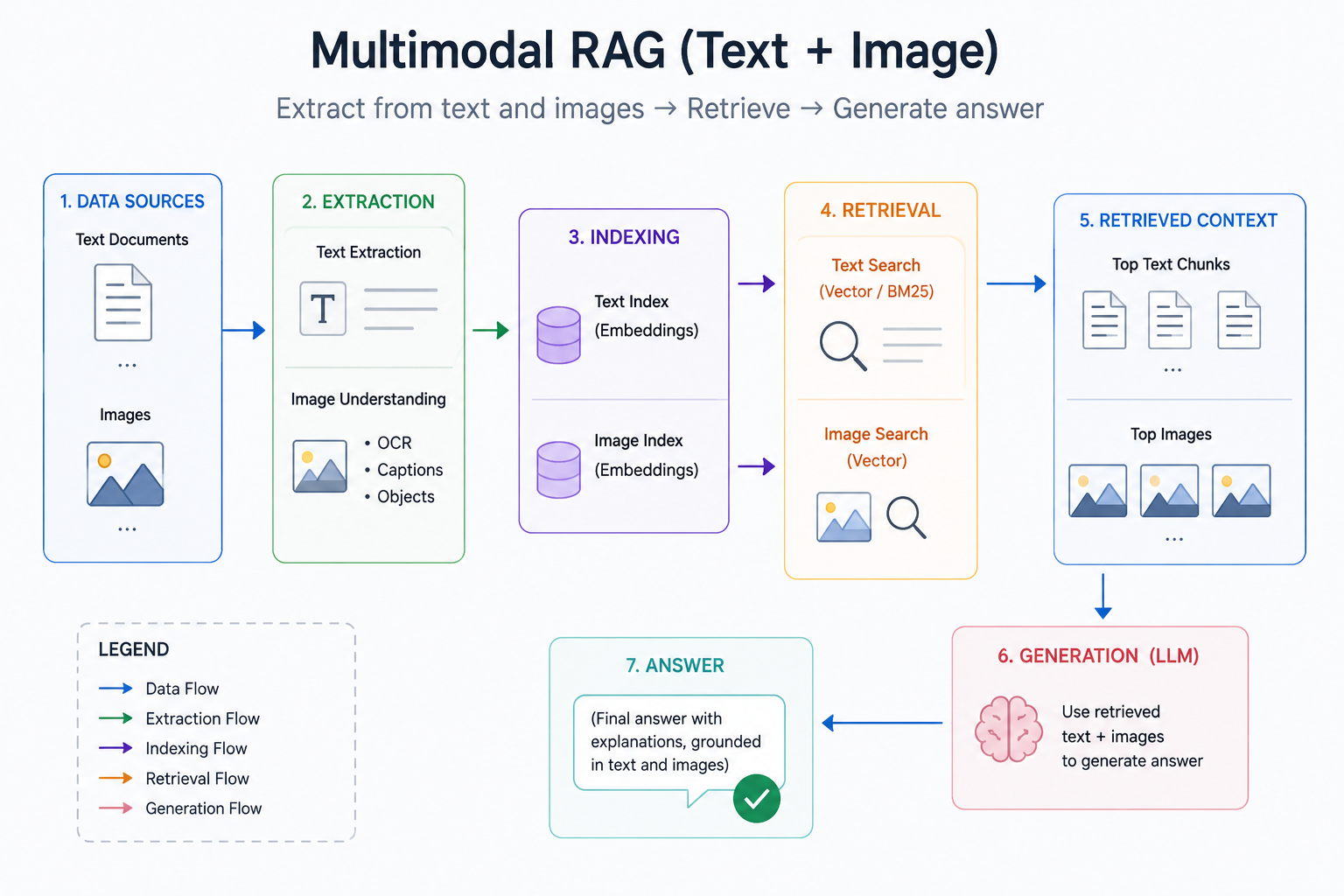
- Multi-modal RAG extracts both text and images from a PDF, then uses a vision model to write a short caption for each image. Those captions are embedded and stored with the text chunks.
- At query time, the same vector search can match a text paragraph or an image caption — so questions about a figure can still retrieve useful context.
Standard RAG vs multi-modal RAG
| Standard RAG | Multi-Modal RAG |
|---|---|
| Extract text only | Extract text and images |
| Images are ignored | Images are captioned by a vision model |
| Vector store has text chunks | Vector store has text chunks and image captions |
Pipeline
PDF
 |-- text pages --------\
 |                       --> chunk --> one vector store --> retrieve --> LLM answer
 |-- images --> captions/
- Extract text and images from a PDF.
- Caption each image with a vision LLM.
- Chunk both page text and captions.
- Store everything in one vector store.
- Query retrieves the best chunk — whether it came from text or an image.
Models used
- Vision / chat LLM:
gemma3:12bvia Ollama (captioning + answer generation) - Embeddings:
mxbai-embed-large:335mvia Ollama
Step by Step Coding guide
- Pull models first:
ollama pull gemma3:12bandollama pull mxbai-embed-large:335m. - Install helpers such as
pymupdf,Pillow,ollama,langchain,langchain-ollama,langchain-community, andchromadb.
Step 0: Import packages
import fitz  # PyMuPDF
from PIL import Image
import io
import os
import urllib.request
import ollama
from langchain_core.prompts import ChatPromptTemplate
from langchain_core.documents import Document
from langchain_core.output_parsers import StrOutputParser
from langchain_text_splitters import RecursiveCharacterTextSplitter
from langchain_community.vectorstores import Chroma
from langchain_ollama.embeddings import OllamaEmbeddings
from langchain_ollama import ChatOllama
Step 1: Download the paper
- We use the classic Attention Is All You Need paper — it has both text and important diagrams.
pdf_path = "attention_is_all_you_need.pdf"

if not os.path.exists(pdf_path):
    urllib.request.urlretrieve(
        "https://arxiv.org/pdf/1706.03762",
        pdf_path,
    )
    print("Downloaded paper")
else:
    print("Paper already exists")
Step 2: Extract text and images from the PDF
- Use PyMuPDF (
fitz) to pull:- Text from each page
- Images (figures, diagrams) saved under
extracted_images/
text_data = []
os.makedirs("extracted_images", exist_ok=True)
image_count = 0

with fitz.open(pdf_path) as pdf_file:
    for page_number in range(len(pdf_file)):
        page = pdf_file[page_number]

        text = page.get_text().strip()
        text_data.append({"response": text, "name": page_number + 1})

        for image_index, img in enumerate(page.get_images(full=True)):
            xref = img[0]
            base_image = pdf_file.extract_image(xref)
            image_bytes = base_image["image"]
            image_ext = base_image["ext"]

            image = Image.open(io.BytesIO(image_bytes))
            image.save(
                f"extracted_images/image_{page_number+1}_{image_index+1}.{image_ext}"
            )
            image_count += 1

print(f"Extracted text from {len(text_data)} pages")
print(f"Extracted {image_count} images")
print("Images saved to: extracted_images/")
Step 3: Caption each image with a vision model
- Send each image to
gemma3:12b(vision-capable) and ask for a short retrieval-friendly caption. - Captions become searchable text in the vector store.
img_data = []

caption_prompt = (
    "You are an assistant tasked with summarizing tables, images and text for retrieval. "
    "These summaries will be embedded and used to retrieve the raw text or table elements. "
    "Give a concise summary of the table or text that is well optimized for retrieval. "
    "Table or text or image:"
)

image_files = sorted(os.listdir("extracted_images"))
for img_name in image_files:
    img_path = f"extracted_images/{img_name}"

    response = ollama.chat(
        model="gemma3:12b",
        messages=[
            {
                "role": "user",
                "content": caption_prompt,
                "images": [img_path],
            }
        ],
    )

    caption = response.message.content
    img_data.append({"response": caption, "name": img_name})
    print(f"  {img_name}: {caption[:100]}...")

print(f"\nCaptioned {len(img_data)} images")
Step 4: Chunk text and captions, build the vector store
- Split page text and image captions, then store both in one Chroma collection.
- At retrieval time, a query can match either type.
embedding_model = OllamaEmbeddings(model="mxbai-embed-large:335m")

docs_list = [
    Document(
        page_content=t["response"],
        metadata={"name": t["name"], "type": "text"},
    )
    for t in text_data
]
img_list = [
    Document(
        page_content=i["response"],
        metadata={"name": i["name"], "type": "image"},
    )
    for i in img_data
]

text_splitter = RecursiveCharacterTextSplitter.from_tiktoken_encoder(
    chunk_size=400, chunk_overlap=50
)
doc_splits = text_splitter.split_documents(docs_list)
img_splits = text_splitter.split_documents(img_list)

print(f"Text chunks: {len(doc_splits)}")
print(f"Image caption chunks: {len(img_splits)}")

all_splits = doc_splits + img_splits
vectorstore = Chroma.from_documents(
    documents=all_splits,
    collection_name="multi_model_rag",
    embedding=embedding_model,
)

retriever = vectorstore.as_retriever(
    search_type="similarity", search_kwargs={"k": 1}
)

print(f"\nVector store created with {len(all_splits)} total chunks")
Step 5: Query and generate an answer
- Ask about a figure in the paper. The retriever should prefer the matching image caption; the LLM then answers from that context.
query = "how many boxes are in the Scaled Dot Product Attention?"
print(f"Query: {query}\n")

docs = retriever.invoke(query)
print(f"Retrieved {len(docs)} document(s):")
for d in docs:
    print(f"  Type: {d.metadata.get('type', 'unknown')}")
    print(f"  Source: {d.metadata.get('name', 'N/A')}")
    print(f"  Content: {d.page_content[:200]}...")

llm = ChatOllama(model="gemma3:12b", temperature=0)

answer_prompt = ChatPromptTemplate.from_messages(
    [
        (
            "system",
            "You are an assistant for question-answering tasks. "
            "Answer the question based upon the retrieved documents. "
            "Use three-to-five sentences maximum and keep the answer concise.",
        ),
        (
            "human",
            "Retrieved documents:\n\n<docs>{documents}</docs>\n\n"
            "User question: <question>{question}</question>",
        ),
    ]
)

answer_chain = answer_prompt | llm | StrOutputParser()
answer = answer_chain.invoke(
    {"documents": docs[0].page_content, "question": query}
)

print(f"\nAnswer: {answer}")
Summary
- Multi-modal RAG turns figures into searchable captions, then uses the same retrieve → generate loop as text-only RAG.
- A question about the “Scaled Dot Product Attention” diagram works because the vision caption describes what is in the figure.
- Trade-off: captioning every image adds LLM/vision cost up front; you gain coverage of visual content that plain PDF text extractors skip.
- Related posts: Fusion Retrieval (blend keyword + vector scores) and GraphRAG (expand context over a knowledge graph).